As an Amazon Associate, we earn from qualifying purchases. Some links on this site are affiliate links at no extra cost to you. Our recommendations are based on thorough research and editorial judgment.


Understanding EQ: How to Shape Your Podcast Voice

Understanding EQ is essential for podcasters looking to refine their voice. EQ modifies frequency response, boosting or cutting specific ranges, to improve audio quality. Begin with a high-pass filter at 80 Hz to cut out low rumble. Focus on the 80-120 Hz range for warmth and bump up 2-3 kHz for clarity. Just remember, gentle adjustments work wonders—aim for 3-5 dB changes. Stick around to discover more secrets to mastering your podcast sound!
Key Takeaways
- Apply a high-pass filter to eliminate low-frequency rumble, ideally setting it between 80-100 Hz.
- Boost the warmth range of 80-120 Hz to enhance the richness of your voice.
- Cut frequencies around 200-300 Hz to reduce muddiness and improve overall clarity.
- Boost the presence frequency range of 2-3 kHz for better intelligibility and engagement.
- Use modern audio tools for real-time EQ adjustments to ensure optimal sound quality during recording.
What Is EQ?
Equalization, or EQ, acts like a sound sculptor, shaping audio to improve its quality. It’s the process of modifying the frequency response of an audio signal. With human hearing spanning from 20 Hz to 20,000 Hz, EQ can boost or cut specific frequencies to enhance audio quality. This tool is particularly helpful in recording sound, allowing creators to highlight clarity or minimize unwanted noise. There are various EQ filters, like high-pass or bell filters, each designed for unique tasks in sound shaping. The gain control adjusts the amplitude of selected frequencies, giving you the power to amplify certain sounds or gently push background noise into the shadows. Modern interfaces like the RDECaster Pro II include advanced EQ tools and noise gates for professional-grade sound enhancement. So, grab your DAW and start experimenting! Your ears will thank you.
Why Does EQ Matter?

In the vibrant world of podcasting, EQ plays an essential role in transforming ordinary voices into enthralling audio experiences. It enhances clarity and warmth, making voice recordings more engaging. By adjusting frequencies, including using a high-pass filter to eliminate low-frequency rumble, podcasters balance their audio landscape. This not only improves sound quality but also guarantees that voices are distinct, reducing frequency masking that can muddle sound.
Focusing on key ranges—80-120 Hz for warmth, 2-3 kHz for clarity, and 300 Hz-1 kHz for intimacy—podcasters can tailor their unique sound. Effective EQ often cuts frequencies rather than boosts them, leading to a cleaner, more professional result. After all, no one wants to listen to muddy audio! The 32-bit float recording capabilities of modern portable recorders like the Zoom H6 help prevent audio clipping issues before EQ processing even begins.
How Do You Equalize Your Voice as a Podcaster?

How can a podcaster make their voice sound amazing? First, they should apply a high-pass filter to cut frequencies below 80 Hz, wiping out any unwanted rumble. Next, adding warmth comes from targeting the 80-120 Hz range, but beware of boominess—less is more here. To enhance clarity, it’s essential to cut frequencies around 200-300 Hz; this reduces muddiness, making everything clearer. Boosting the 2-3 kHz range can truly make your voice pop, improving intelligibility and presence. For managing sibilance, a de-esser is a better choice than EQ cuts in the 5-15 kHz range. These EQ settings create a clear sound that keeps listeners engaged and excited about your content. Your voice deserves the spotlight! High sound quality is crucial for maintaining audience retention and satisfaction in your podcast episodes.
Recommended Products

BLACK ARMS ON A WHITE CONSOLE — CAMERA-CONTRAST FOUR-HOST PODCAST STUDIO IN ONE BOX: A four-host studio needs more than the console — four broadcast mics, four arms that frame each host on camera, four headphone pairs, and cables to wire it. This bundle pairs the RODECaster Pro II (White) with 4 PodMic mics, 4 PSA1+ Black arms, 4 Cans50 headphones, 4 ten-foot XLR cables, and a 32GB microSDHC card. Podcast producers, panel hosts, and roundtable engineers — plug in and record today.

TABLETOP 4-HOST PODCAST STUDIO IN ONE BOX — CONSOLE, FOUR MICS, FOUR TRIPODS, FOUR HEADPHONES: Recording four hosts around a single table needs more than a console alone — you need matching mics for every host, a way to position each mic at speaking distance, closed-back monitoring per host, and the cables to wire it. This bundle pairs the Rode RODECaster Pro II 9-channel console with 4 Zoom ZDM-1 Podcast Mic Packs. Multi-host podcasters, panel-show producers, travel podcast crews, and broadcast roundtable hosts — set up the table, plug in, and start recording today.

SIXTEEN VOICE EFFECTS AND THREE-PART HARMONIES – Offers 16 professional vocal effects and adds up to three-part harmonies to your voice in real time, giving singers, performers, and content creators a full vocal production toolkit.
How an Equalizer Works

Imagine stepping into a sound engineer’s world, where audio magic happens! An equalizer, or EQ, is your main tool for modifying those frequencies. It lets podcasters boost or cut specific frequency bands, tuning the tonal quality of voice recordings. Typically, frequencies range from 20 Hz up to 20 kHz, and adjustments are measured in decibels (dB). With EQ, you adjust gain settings to decide how loudly or softly each band sings. Plus, bandwidth (Q) helps control the range you want to tweak. Whether you’re cutting unwanted frequencies or enhancing clarity, EQ is essential for crystal-clear audio. And let’s be honest, nobody wants to sound like they’re recording from a cave! Just like the PreSonus Eris series monitors, proper EQ settings allow for customizable acoustic tuning to achieve the perfect voice sound for your specific recording environment.
The 4 Types of Equalization Filters

Equalization filters play a key role in shaping the sound quality of audio recordings, enhancing the listener’s experience. An equalizer is a plugin that offers various types of filters. High pass filters (HPF) remove unwanted low frequencies, making voices clearer while reducing noise. Conversely, low pass filters (LPF) cut high frequencies, emphasizing those lower tones for a smoother sound. Band-pass filters allow a specific frequencies range, perfect for achieving unique tonal qualities. Notch filters target narrow resonant frequencies, effectively eliminating annoying sounds like hums or feedback without compromising overall audio quality. Mastering these four types of filters can elevate your podcast voice to new heights, making your content more enjoyable and engaging for listeners. Quality high pass filters typically feature power handling ratings above 200 watts to accommodate high-powered audio systems.
Recommended Products

Integrated reverb effect adds spaciousness and depth to your sound

NEW & IMPROVED FEATURES: With the addition of a new filter, the SE846 Gen 2 offers 4 different sound signatures that offer a more expansive listening experience than the original SE846.

Navigation Receiver with 7" capacitive touchscreen and AM/FM tuner
Parametric EQ Vs Graphic EQ
While both parametric and graphic EQs serve essential roles in audio production, they each cater to different needs and skill levels. A parametric EQ offers precise control over frequency bands, allowing you to adjust parameters like frequency, gain, and Q (bandwidth). This means you can make targeted sound adjustments to enhance or diminish specific audio characteristics. On the other hand, a graphic EQ has fixed frequency bands displayed via sliders. This provides a clear visual for broad, quick adjustments—great for live settings! Ultimately, choosing between a parametric and graphic EQ boils down to your audio project’s requirements. If you’re into detailed sound shaping, the parametric EQ shines. But if quick fixes are your jam, the graphic EQ is your go-to. When using either EQ type, consider incorporating pad attenuators to prevent audio clipping and achieve more controlled sound levels in high-volume situations.
Recommended Products

All In One: Music Streamer,DAP,DAC,Preamp all in DMP-A8, Each one of these jobs, it's up to the task. It will be a great component to your audio system. Easy control via 6" large LCD color touchscreen and Exclusive mobile APP for Android/IOS mobile phones and tablets.

Bundle Includes: Alpine ILX-F511 Halo11 Multimedia Receiver w/ 11" Touchscreen Display, SWI-RC Steering Wheel Control Interface, Creative Audio Coozy, 4-piece set of Plastic Pry Tools

Digital multimedia receiver with AM/FM tuner (does not play discs)
Best EQ Settings for a Podcast
To create the best sound for a podcast, it’s vital to understand how EQ can shape audio quality. Start by setting a high-pass filter at 80-100 Hz; this helps eliminate any low-frequency rumble that can muddy your audio. Next, boost the presence range between 1-4 kHz to enhance voice clarity, making it easier for listeners to engage. You may also want to gently roll off high frequencies above 10 kHz to reduce sibilance and harshness, ensuring smoother sound. Don’t forget low-mid reduction around 150-300 Hz; it helps prevent that annoying boominess, especially in male voices. Remember, gentle adjustments of 3-5 dB work wonders without altering the natural charm of your voice! For optimal recording quality, consider using a dynamic microphone setup that includes built-in shock mounting to minimize unwanted noise during your podcast sessions.
Recommended Products

2 x C414 XLS Sonically Matched Pair - Engineered for highest linearity and neutral sound for beautifully detailed recording of vocals and any acoustic instrument

COMPLETE 4-PERSON PODCAST STUDIO KIT: Includes Rode RODECaster Pro 2 podcast mixer, 4x Rode PodMic broadcast microphones, 4x PSA1+ professional boom arms, 4x StreamEye Cans50 over-ear headphones, 4x XLR cables, and 32GB SD card. Everything needed to record, stream, or broadcast with up to 4 participants right out of the box.

STUDIO CONDENSER UPGRADE — TLM 103 LARGE-DIAPHRAGM CONDENSER WITH ELASTIC SUSPENSION MOUNT: A bare TLM 103 ships with the rigid SG 2 swivel mount, which transmits desk and stand vibration straight into the take — you need an elastic suspension built for the body and the K 67/87 capsule it carries. This bundle pairs the Neumann TLM 103 with the official Neumann EA 4 elastic shock mount. Voice-over artists, audiobook narrators, broadcast engineers, and mastering professionals — drop the mic in the EA 4 cradle and track.
How to EQ Voice for Podcast: Simple Tricks That Work
Getting the right sound for a podcast voice can feel like magic, but it’s mostly just smart EQing. Start by applying a high-pass filter around 80-100 Hz to cut low-frequency rumble. This tactic enhances clarity, making your podcast sound more professional. Next, reduce frequencies in the 150-300 Hz range to minimize that pesky boominess. For a voice that’s crystal clear, boost the presence range between 1-4 kHz—trust us, it makes a difference! Don’t forget to roll off gently above 10 kHz to tackle sibilance and unwanted noise. Finally, remember that cuts often lead to a more natural podcast sound than boosts. Who knew EQing could be so straightforward? It’s like giving your voice a stylish haircut! Modern software like SOUND FORGE Audio Studio offers comprehensive EQ tools that make these adjustments remarkably simple.
The Main EQ Rules
Understanding the main EQ rules can make a world of difference in podcasting. First off, prioritize cutting frequencies instead of boosting them. This keeps your sound natural and smooth. Aim for adjustments of just 3-5 dB to preserve the integrity of your voice recording. When adjusting, bell curves work wonders for target frequencies, while shelf filters can touch more frequencies—each has its place. Start your EQ journey with a high-pass filter, setting it above 80 Hz, which minimizes pesky low-frequency noise and clarifies your audio signal. Remember, finding those problematic resonances and gently cutting them will enhance the overall quality. EQ isn’t rocket science, but mastering it can rocket your podcast to the next level! Using an audio interface with zero-latency monitoring capabilities ensures you can make real-time EQ adjustments while recording without any distracting delays.
Podcast EQ: AI-Powered Alternatives Rule the Market
As the audio landscape evolves, AI-powered tools are taking podcast EQ to new heights. These smart solutions, like Podcastle, make use of advanced algorithms to analyze recordings and apply EQ with ease, enhancing dynamic range and even high frequencies effortlessly. Podcasters can now enjoy a smooth audio workstation experience without wading through complicated settings. Many AI tools include a “magic dust” feature, automatically boosting audio to studio-grade levels—talk about convenient! Plus, this means less time spent on applying EQ and more time creating engaging content. With these user-friendly, innovative tools, achieving professional audio quality is now accessible to everyone, from seasoned pros to rookies fumbling their first podcast recording. Who knew audio magic could be so easy? Modern cardioid pickup patterns help significantly reduce unwanted background noise while maintaining crystal-clear voice quality.
Recommended Products
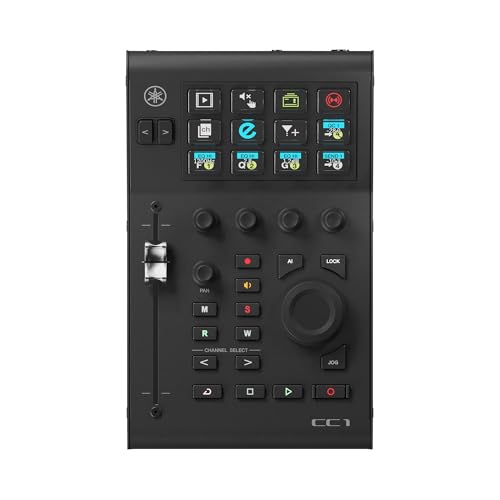
ADVANCED INTEGRATION - A versatile controller that goes beyond DAW

BREAKTHROUGH SPATIALIZED AUDIO: Super immersive sound spatializes everything, taking the music out of your head and placing it in front of you to push the boundaries of listening.

Newest 8-Core 6G+128G & Android 15 System: For 2020 FJ Cruiser radio features a latest 8-core CPU and Android 15 System, experience lightning-fast speed and flawless performance. With 6GB RAM and 128GB ROM, enjoy smooth multitasking and ample storage for all your apps and media. Powerful, stable, and incredibly responsive — no lag, just seamless driving entertainment.
Applying EQ to a Voice Recording
Applying EQ to a voice recording can transform an ordinary podcast into something truly special. To make your audio sound the best, start with a high-pass filter around 80-100 Hz to clear out any low-end rumble. Next, consider cutting frequencies between 100-300 Hz, which helps reduce muddiness. Boosting the 1-4 kHz range can really bring voices to life and make them clear and engaging. To tame sibilance and prevent harsh sounds, gently roll off high frequencies above 10 kHz. Remember, small adjustments—like 3 dB or less—preserve the natural tone of the voice, avoiding that robot-like quality some EQ settings can create. So, keep it subtle and enjoy the magic of better audio quality!
Addressing Common EQ Issues in Different Environments
Sound quality can really vary based on the environment where recordings take place. In home studios, using a high-pass filter below 80-100 Hz can help eliminate low-end rumble, while a narrow cut of 3-5 dB in the 100-300 Hz range addresses room resonance and muddy voice quality. Outdoor recordings? Go for an aggressive high-pass filter around 120-150 Hz to reduce unwanted low-frequency noise. Portable setups should also use a high-pass filter at 100 Hz or higher to minimize background noise. Boosting clarity with a wide enhancement in the 3-5 kHz range helps in noisy spaces. Professional studios often apply subtle EQ adjustments, maintaining natural voice quality while enhancing pleasant frequencies. Remember, every space has its quirks!
Frequently Asked Questions
How to Set up EQ for Podcast?
To set up EQ for a podcast, apply a low cut under 100 Hz, boost high frequencies for clarity, adjust mids to reduce boominess, and consider room acoustics to enhance overall vocal clarity and listener experience.
How to Use EQ to Make Your Voice Sound Better?
Studies show that 70% of listeners prefer clear audio. To enhance voice clarity using EQ techniques, adjust frequency ranges with proper podcast equipment, incorporate acoustic treatment, practice vocal warm-ups, and refine sound editing for ideal results.
How to Make Your Voice Sound Better for Podcasts?
To enhance podcast voice quality, one should focus on voice projection and vocal warm-ups, utilize effective recording techniques, select the right microphone, improve sound absorption, and incorporate audio mixing and post-production effects for best results.
How to Find the Best EQ for Your Voice?
To find the best EQ for one’s voice, analyze voice characteristics through spectral analysis, consider mic selection and recording environment, apply EQ fundamentals, and tailor audio processing to accommodate listener preferences effectively and enhance clarity.