As an Amazon Associate, we earn from qualifying purchases. Some links on this site are affiliate links at no extra cost to you. Our recommendations are based on thorough research and editorial judgment.


How to Use a Noise Gate for Cleaner Podcast Audio

To use a noise gate for cleaner podcast audio, start by selecting software like MyEdit Audio, which is free and user-friendly. Upload your audio file and adjust the threshold slider until unwanted background noise gets muted. Real-time previews let you hear changes instantly, making fine-tuning easy. Aim for a dynamic range of around 100 dB for best results. It’s like giving your podcast a fresh haircut—cleaner and sharper! Stick around to find more tips on perfecting your sound.
Key Takeaways
- Select a reliable noise gate software, such as AudioDirector or MyEdit Audio, for effective noise reduction during podcasting.
- Upload your audio file and adjust the threshold level to filter out unwanted background noise while maintaining desired vocal clarity.
- Utilize real-time preview features to listen to adjustments, ensuring fine-tuning leads to optimal audio quality before finalizing.
- Maintain a consistent speaking volume and minimize environmental noise during recording to enhance the efficacy of the noise gate.
- Regularly test and calibrate settings based on different recording environments to achieve and maintain professional-grade audio clarity.
What Is a Noise Gate?
A noise gate is like a superhero for your audio, swooping in to save the day by silencing unwanted background noise. This audio processing tool detects sounds below a certain threshold, muting them while letting louder audio pass through. Unlike a compressor, which tames loud sounds, a noise gate focuses on reducing background noise. Picture it as your personal audio bouncer.
Whether used as a software plugin or a hardware device, it’s especially helpful for podcasts, cutting out distractions like that pesky refrigerator hum. To achieve clean audio, hosts must carefully adjust the noise gate’s threshold and timing settings, ensuring they don’t unintentionally silence important dialogue. A touch of finesse here can make all the difference in your recordings! Just as high CRI lighting ensures true-to-life color representation in art studios, a properly configured noise gate preserves the natural quality of your voice while eliminating unwanted sounds.
Best Noise Gate Software

Finding the right noise gate software can feel a bit like searching for a needle in a haystack. Fortunately, some top options stand out. AudioDirector is hailed as the best noise gate software, offering extensive noise reduction, and enhancing overall sound quality for audio production. It allows users to easily apply a noise gate by steering to the “Apply Effect” section. For those seeking a free option, MyEdit Audio is a web-based tool that supports multiple formats and includes a noise gate feature. When selecting software, look for user-friendly interfaces, real-time preview options, and batch processing capabilities. With the right tools, reducing unwanted noise and enriching audio recordings becomes a breeze, making your podcast sound professional. Recording at 24-bit/192kHz quality ensures the clearest possible audio for precise noise gate application.
Recommended Products

[Noise Gate pedal] Noise reduction range: -70—+10dB.

State-of-the-art Multiband or Hard noise gate modes for instant noise removal

Use it as an inline noise gate or to gate an entire effects loop
How to Use a Noise Gate Online

Web-based tools like MyEdit Audio make using a noise gate an absolute breeze. To start, upload your audio file in .WAV or .MP3 format. Next, adjust the threshold level with a handy slider. This lets you set the cutoff point, cutting out background noise that can clutter your podcast. Keep an ear on those ambient noise levels; you want to eliminate unwanted sounds without affecting your speech. Many tools offer real-time preview, so you can hear changes instantly—like magic! Once it sounds just right, simply download the cleaned-up audio file to keep all those fabulous adjustments. And just like that, you’ve transformed your recording into a clearer, more professional-sounding gem! For optimal results, aim for a dynamic range of at least 100 dB to ensure your noise gate captures every subtle detail in your recording.
Recommended Products

2× Stronger Voice Reduction vs Liberty 4 NC: Upgraded ANC 3.0 technology and a redesigned acoustic cavity target and reduce human voices 2× more effectively than Liberty 4 NC, helping you stay focused and enjoy quieter commutes on trains or subways.

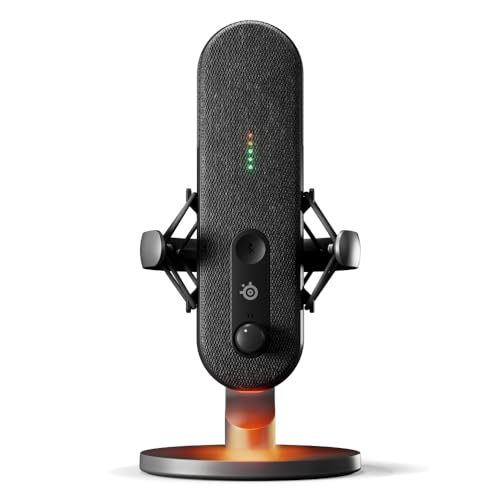
DESIGNED FOR GAMERS - Mic for gaming, broadcasting, and podcasting, level up your stream with Alias and free audio software. Cardioid polar pattern.
How to Use Noise Gate Software

Ready to kick your podcast audio up a notch? First, download noise gate software like AudioDirector or MyEdit Audio. These programs make it easy to enhance sound quality with their user-friendly interfaces. After importing your audio file, just find the noise gate effect in the menu and apply it to your track. Adjust the threshold level with a slider to cut out background noise and unwanted noise. Make sure to test and preview in real time; it’s key for finding that sweet spot. Want a smoother workflow? Batch processing allows you to tackle multiple files at once. Finally, don’t forget to export or save your work to keep that improved clarity for your listeners. Happy editing! For optimal results, consider using a cardioid polar pattern microphone which helps minimize surrounding noise during recording.
Recommended Products
![MixPad Free Multitrack Recording Studio and Music Mixing Software [Download]](https://m.media-amazon.com/images/I/71ltIxIuz1L._SL500_.jpg)
Create a mix using audio, music and voice tracks and recordings.
![MixPad Multitrack Recording Software for Sound Mixing and Music Production Free [Mac Download]](https://m.media-amazon.com/images/I/51kaO82jYOL._SL500_.jpg)
Mix an audio, music and voice tracks

ONE MICROPHONE IS ENOUGH: Ideal for Studio Recording, Home Recording, Podcasting and Live Streaming. The PD400X podcast dynamic microphone is loved and trusted by customer all over the world, proofed by kickstarter, digital journal and more professional media
Features of Effective Noise Gate Software

When looking for effective noise gate software, several key features stand out. A user-friendly interface is essential, making navigation a breeze for everyone, even newbies. Real-time preview options allow users to hear changes live, helping to fine-tune audio effectively. Nobody wants to guess if they’ve nailed the settings; immediate feedback is a game changer! Batch processing capabilities are another big win, letting users apply settings across multiple files simultaneously—goodbye, endless clicks! Plus, compatibility with various audio formats means podcasters can handle any content with ease. Finally, remember lightweight operation helps keep your system speedy, especially with high-res files. Just like balanced cable designs help reduce electromagnetic interference in XLR cables, proper noise gate settings eliminate unwanted background noise while preserving audio clarity. So, choose wisely and you’ll reduce stage noise while eliminating unwanted distractions from your recording!
Recommended Products
![WavePad Audio Editing Software - Professional Audio and Music Editor for Anyone [Download]](https://m.media-amazon.com/images/I/B1fcLEGCs6S._SL500_.png)
Full-featured professional audio and music editor that lets you record and edit music, voice and other audio recordings
Full-featured professional audio and music editor that lets you record and edit music, voice and other audio recordings
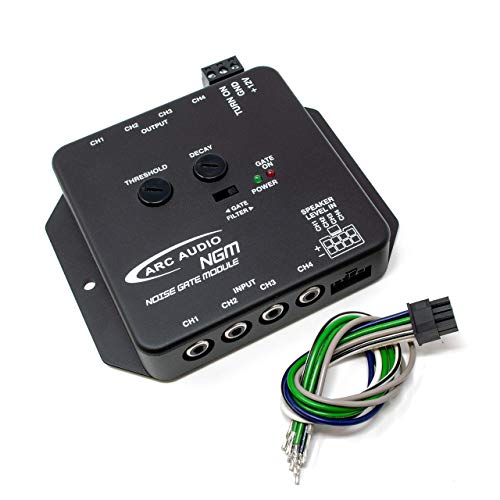
Low Level (RCA) Or Speaker Level Inputs
Benefits of Using a Noise Gate
A noise gate is a powerful tool for podcasters looking to enhance their audio quality. By filtering out unwanted background noise, like refrigerator hums and distant traffic sounds, it creates a cleaner listening experience. This means your audio tracks sound polished and professional, keeping listeners engaged without distractions.
It works by setting a noise threshold, cutting low-level ambient noise during pauses. Not only does this boost sound quality, but it also enhances the dynamic range of the podcast, allowing voices to shine through. Best of all, using a noise gate is a cost-effective solution. You don’t need fancy soundproofing or expensive gear to achieve impressive audio clarity. It’s like magic, but without the wand! Similar to how clean wind energy powers sustainable battery solutions, noise gates provide an efficient way to maintain audio quality while reducing unwanted background interference.
Noise Gate Settings to Consider
Choosing the right settings for a noise gate can make a world of difference in podcast audio quality. Start with the gate threshold; adjust this based on the ambient volume of background noise, finding that sweet spot where unwanted sound gets muted. Next, consider your attack time—fast or slow? A quicker response is great for sharp sounds, while a slower one creates a natural feel. Don’t forget about decay time; this setting controls how quickly the gate closes after audio signals drop, preventing annoying choppiness. Finally, play with the hold duration, allowing a smooth shift between sounds. Most software noise tools let you preview your changes, making it easier to fine-tune settings without the guesswork. Combining noise gates with a cardioid pickup pattern helps further isolate your voice from unwanted background noise. Happy gating!
Tips for Optimal Noise Gate Performance
Ideal noise gate performance starts with a solid understanding of your recording environment. Begin by measuring the ambient sound volume; this helps you set the gate threshold right above background noise levels. Adjust the threshold to block unwanted noise while keeping your voice clear during speech. For smooth audio, use an attack time of about 10-30 milliseconds, avoiding any abrupt cuts. Don’t forget to set a sufficient hold duration—this keeps the gate open during short pauses without cutting you off mid-sentence. Finally, play around with decay time; too fast and you’ll have choppy changes, too slow and you’ll sound like you’re in a cave. Finding balance is key! For professional-grade results, aim for a signal-to-noise ratio above 70 dB when configuring your noise gate settings.
Frequently Asked Questions
What Should the Noise Gate Setting Be for a Podcast?
For podcasts, ideal thresholds should range between -60 dB and -20 dB. With an attack speed of 5-15 milliseconds and release settings of 100-300 milliseconds, audio clarity improves, enhancing the overall dynamics and reducing noise floor interference.
How to Reduce Background Noise for Podcasts?
To reduce background noise for podcasts, implement soundproofing techniques, optimize room acoustics, and apply microphone placement strategies. Additionally, utilize noise reduction software and sound treatment solutions to enhance podcast audio quality effectively.
How Do You Remove Background Noise From Podcastle?
Like a skilled sculptor chiseling away excess stone, one can remove background noise in Podcastle during audio editing. By adjusting noise gate settings, improving sound quality becomes achievable through mindful equipment recommendations and effective post-production tips.
How to Properly Use a Noise Gate?
To properly use a noise gate, one should understand noise gate basics and make setting adjustments in audio software, focusing on the noise floor and vocal clarity through effective recording techniques for ideal results.