As an Amazon Associate, we earn from qualifying purchases. Some links on this site are affiliate links at no extra cost to you. Our recommendations are based on thorough research and editorial judgment.


Podcast Audio Standards: Technical Requirements for Spotify and Apple

For podcast audio on Spotify and Apple, start with quality formats like WAV or FLAC, both needing a minimum sampling rate of 44.1 kHz. If you opt for MP3, keep the bitrate around 128-256 kbps for stereo to guarantee great sound. Aim for loudness levels around -14 to -16 LUFS for a cleaner listen. Want to know more about mastering or even the ins and outs of dynamic music? There’s plenty to explore!
Key Takeaways
- Spotify requires a loudness level of -14 LUFS, while Apple Music targets -16 LUFS for optimal audio playback.
- Both platforms mandate a minimum sampling rate of 44.1 kHz for audio files to ensure quality.
- Stereo audio is essential for both services, promoting better playback consistency across devices.
- Recommended bitrates for streaming are 128-256 kbps for stereo and 32-128 kbps for mono audio formats.
- WAV files are converted to FLAC for Spotify, emphasizing the need for high-quality masters during submission.
Audio Requirements for Subscriber Audio in Apple Podcasts Connect

When it comes to audio requirements for subscriber audio in Apple Podcasts Connect, there’s a lot to reflect on. First off, audio quality really matters! Apple accepts files in WAV, FLAC, or MP3 formats. For the best playback experience, stereo audio sources are a must. If you’re using WAV or FLAC, shoot for a sampling rate of 44.1 kHz—pretty standard, right? You can choose between 16-bit or 24-bit resolution, which is cool since they both sound great. For MP3 files, you’ll need the same sampling rate, but minimum bit rates of 64 kbps for stereo and 32 kbps for mono are vital. Remember, keeping loudness around -16 dB LKFS really is what the podcast gods intended! Using an active direct box can significantly enhance your audio quality by providing optimal impedance matching and minimizing unwanted noise interference.
WAV and FLAC Specifications

Diving into the specifications of WAV and FLAC formats reveals just how essential these details are for quality audio. Both formats require a minimum sampling rate of 44.1 kHz and support resolutions of 16-bit or 24-bit. If you’re not a fan of single-channel audio, good news! They need two identical channels for non-stereo sources. Streaming platforms often convert WAV files to FLAC for high-quality playback, ensuring ideal sound for listeners. Notably, FLAC specifications closely mirror WAV, providing lossless audio that keeps every detail intact. Higher sampling rates are accepted, but if they exceed this standard, they’re downsampled to 44.1 kHz / 24-bit. After all, nobody wants audio that sounds like it’s stuck in a tin can! Professional-grade recording requires supercardioid pickup patterns to significantly reduce unwanted background noise and ensure pristine audio quality.
Recommended Products

[Natural Audio Clarity] Operated with frequency response of 50Hz-16KHz, the podcasting XLR mic delivers balanced audio range, likely to resonate with your audience. Directional cardioid dynamic microphone corded will not exaggerate your voice, while rejects unwanted off-axis noise for vocal originality and intelligibility during your PS5 gaming streaming video recording. (Tips: Keep the top of end-addressing XLR dynamic microphone AM8 facing audio source, and suggested recording range is 2 to 6 in.)

Cardioid Pick-up: Ccardioid pickup pattern that captures clear and crisp voice in front of the mic and suppresses unwanted background noise. Design for chatting, teleconferencing, recording, podcast
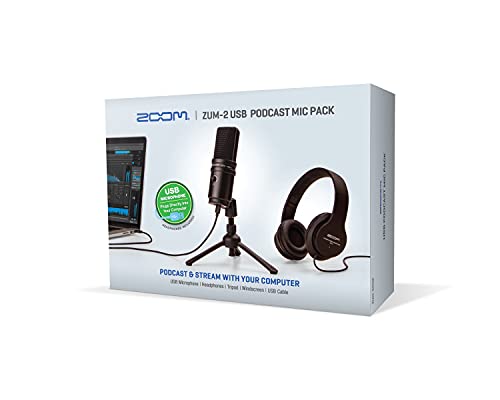
UNBOX AND START YOUR PODCAST TODAY – Includes the ZUM-2 USB condenser microphone, ZHP-2 closed-back headphones, TPS-4 tabletop tripod, foam windscreen, and USB-C cable, giving you everything you need to start podcasting right away.
MP3 Audio Standards

After exploring the high-fidelity world of WAV and FLAC formats, it’s time to turn attention to the ever-popular MP3. This audio file format shines in the podcasting universe, offering versatility with options for mono and stereo audio. For MP3s, a minimum sampling rate of 44.1 kHz is essential. Bitrate matters too; you’ll want at least 32 kbps for mono and 64 kbps for stereo. For better audio quality, consider 96-128 kbps for mono and 128-256 kbps for stereo. Keep volume levels consistent and avoid excessive compression to enhance your audience’s experience. Proper encoding and normalization can make a noticeable difference on platforms like Spotify and Apple Podcasts. Your listeners will thank you! Using a heavy-duty mic stand with non-slip pads ensures stable audio capture without unwanted vibrations or movement during recording.
Recommended Products

Stable Tripod Base: CAHAYA tripod microphone stand has legs that extend wider than most, keeping your microphone securely in place. Hollow bottom supports prevent bending and help distribute weight, reducing vibration. Non-slip foot pads keep the stand in place.

Free Position Mic Arm: This professional microphone stand is fully adjustable in all parts with 360° base rotation for 135° back and forth extension, 180° arm shaft for up-and-down movement, and 270° metal adapter to freely position microphones. It can be easily folded and pushed away for space-saving storage when it stands idle and pull it back for usage.

Height Adjustable: The height of this microphone floor stand is adjustable from 27 inches to 68 inches, easy to move without taking up desktop space.The perfect floor use mic stand for games, recording rooms, guitar playing, piano singing, live broadcasts, podcast etc.
RSS Feed Audio Requirements

To get the most out of your podcast, understanding RSS feed audio requirements is crucial, especially if one desires smooth playback and happy listeners. Podcasts primarily use MP3 and AAC formats. When using MP3, aim for a sampling rate of at least 44.1 kHz. For stereo files, keep your bit rates between 96 to 256 kbps, and if you’re going mono, stick to 32 to 128 kbps. Now, AAC is the superhero here—it delivers better audio quality at similar bit rates, making it a favorite choice. Oh, and don’t forget to use stereo channels! Following these recommendations guarantees successful submissions and keeps your audience engaged. Happy podcasting! Using an omnidirectional lavalier microphone ensures consistent audio capture from all angles during podcast interviews and discussions.
Recommended Products

Wider Compatibility: No matter what kind of phone device you have, the wireless mini mic is compatible with android system and all the iPhone & iPad series, including iPhone 14 below and the latest iPhone 16, 17, series which is usb c port. Moreover, it can also with laptop and tablet, which is convenient for content creators to make recordings with various devices for podcasting, vlogging, live streaming and interviewing
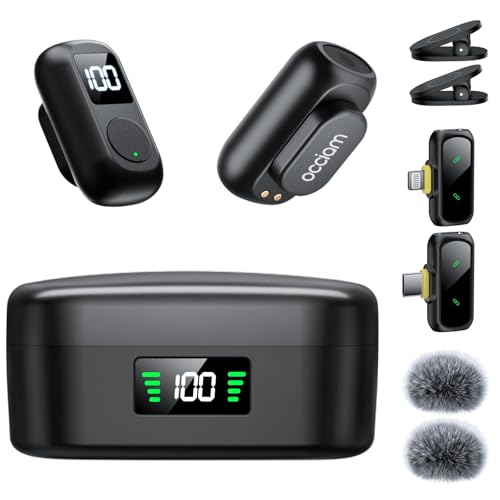
1. AI Noise Cancellation & Stable 328ft Wireless Transmission: Featuring omnidirectional microphones with -21dB to -40dB noise reduction depth,the professional wireless lavalier mic captures crisp human voice while suppressing wind,hum,and crowd sounds.Superior chip ensures stable,interference-free recording up to 328ft (100m Obstacle-Free),delivering studio-clear audio via 48kHz/24-bit resolution,80dB signal-to-noise ratio (pure recordings),and 120dB SPL (handles loud sounds without distortion)

Superior Sound with Active Denoise: Experience exceptional sound clarity with the GoorDik USB C wireless lavalier mic featuring advanced active denoise technology. With dual noise reduction modes – noise reduction mode and original sound mode. The wireless clip-on C port mic is equipped with 2 furry outdoor microphone windscreen muffs and 4 extra foam mic covers, ensuring crystal-clear audio even in noisy and windy environments
Best Practices for Audio Optimization

Optimizing podcast audio can make all the difference in listener satisfaction. For peak streaming quality, it’s best to encode audio in AAC MP4 format. This format minimizes file size while keeping the sound crisp and clear. Aim for a sampling rate of 44.1 kHz with 16-bit or 24-bit resolution for your WAV and FLAC files. True-peak levels should sit around -1 dB FS to prevent distortion, while targeting loudness near -16 dB LKFS promotes consistency. Don’t forget to embed loudness metadata in ID3 tags; this helps your podcast sound the same when streamed without hiccups across devices. Finally, use stereo audio sources, as single-channel audio is usually a no-go on popular platforms like Apple Podcasts. To maximize sound clarity, consider using a microphone with a signal-to-noise ratio of 95 dB or higher. Happy recording!
Recommended Products

Studio-Quality Sound for Clear Podcast Recording – The K66 USB podcast microphone delivers studio-quality, broadcast-level audio using a high-performance condenser capsule and cardioid pickup pattern that focuses on your voice while reducing unwanted background noise. Designed as a reliable microphone for PC, it features a wide 40Hz–18kHz frequency response and a 46kHz sampling rate to reproduce rich lows, smooth mids, and clear highs for natural, detailed vocals. With –45dB ±3dB sensitivity, it captures balanced sound without distortion during expressive speaking. Ideal for podcasting, voice-over, online classes, meetings, and professional content creation.

Custom three-capsule array: This professional USB mic produces clear, powerful, broadcast-quality sound for YouTube videos, Twitch game streaming, podcasting, Zoom meetings, music recording and more

[Authentic Sound Integrity] Experience natural sound reproduction with the podcast microphone with boom arm to preserve the audio sound without distortion. The XLR dynamic microphone boasts a SPL of 130dB, delivering original and consistent recordings. Cardioid pattern reduces ambient noise, ensuring your voice takes center stage, free from distracting background sounds. (For better input volume, record within 2'' to 6'' from the dynamic microphone. )
Delivery and Processing Details
When it comes to delivering high-quality podcast audio, every little detail counts. Spotify converts WAV files to FLAC format, ensuring smooth delivery for their audio processing system. Any sampling rate above 44.1 kHz or 24-bit resolution is downsampled to 44.1 kHz / 24-bit FLAC, which might sound fancy but is significant for compatibility. And if your audio is sampled lower than 44.1 kHz? Well, it gets upconverted to 44.1 kHz / 16-bit. Spotify requests just one stereo master per track, so there’s no need to juggle multiple versions. To truly optimize the delivery experience, it’s vital to send the highest-quality masters. After all, happy listeners deserve superior audio, right? Achieving zero-latency monitoring during recording sessions helps ensure the best possible audio quality before processing begins.
Importance of Mastering for Streaming Platforms
Mastering for streaming platforms is more than just a final touch; it’s a crucial step in delivering an engaging audio experience. Proper mastering helps maintain consistent playback loudness, aiming for around -14 LUFS. This way, artists avoid distortion that can occur during transcoding processes while streaming. Sure, everyone wants their music to sound powerful—just remember that too much loudness can squash dynamics. The most streamed hits on Spotify in 2022 averaged -8.4 LUFS, showing a tightrope walk between max loudness and maintaining that juicy dynamic range. Mastering for streaming doesn’t just polish audio quality; it preserves punchiness and clarity, essential for drawing in listeners amid fierce competition. After all, who doesn’t want to be heard? Much like high-quality polyester in portable green screens ensures durability and wrinkle resistance, proper audio mastering ensures consistent quality across streaming platforms.
Loudness Trends and Targets in Streaming
Loudness trends in the streaming world are a fascinating mix of artistry and technology. In 2022, the top 25 streamed tracks on Spotify averaged -8.4 LUFS, often peaking at -4.0 LUFS—quite loud, right? Major labels tend to disregard the platform’s recommended -14 LUFS loudness, aiming instead to push maximum loudness in their releases. However, this can cause excessive compression, shrinking the dynamic range and making tracks sound flat. Each streaming service has unique loudness targets; for example, Spotify suggests a -1.0 dBTP peak and a dynamic range of 9. Balancing loudness and clarity is essential for a vibrant listening experience, so artists must carefully master their tracks to maintain that engaging dynamic vibe. Who knew loudness could be so tricky? Similar to how LED grow lights provide balanced spectrums for optimal plant growth, audio engineers must find the right balance of frequencies and dynamics for optimal listening experiences.
Understanding Normalization and Measuring LUFS
While many might think loudness is just about cranking up the volume, there’s a bit more to the story—especially when it comes to normalization and measuring LUFS. Normalization helps maintain a consistent playback volume across various tracks, so listeners aren’t constantly fiddling with their volume knobs. LUFS, or Loudness Units Relative to Full Scale, plays an essential role here. It measures how loud a track actually sounds, which is important for streaming services like Spotify. For ideal quality, aiming for around -14 LUFS is perfect. Tools like the LEVELS plugin can help you measure LUFS effectively, offering real-time feedback on loudness and dynamic range. Remember, a balanced loudness can keep your audio vibrant, not flat! Similar to how noise-canceling microphones improve audio clarity in webcam streaming, proper LUFS measurement ensures professional-grade sound quality for your podcast audience.
Benefits of Dynamic Music
Dynamic music frequently transforms the listening experience, making it far more engaging than tracks with a flat sound. It provides exciting contrasts between soft and loud sections, which keeps listeners interested. A broader dynamic range also means tracks are less likely to sound distorted on different playback systems, ensuring a consistent listening experience. Plus, over-compressed music can lose vibrancy, making it less appealing. On the other hand, dynamic music often sticks around longer in playlists, thanks to its timeless charm. Maintaining energy and clarity through dynamic processing allows sound to resonate more effectively with audiences. So, embrace those musical highs and lows; they’re the secret sauce that makes a track truly enchanting! Modern tools like modernEQ and modernReverb in audio restoration software help achieve optimal dynamic range while preserving sound quality.
Mastering Audio for Streaming Platforms
Mastering audio for streaming platforms is an art that combines science and skill to create a polished listening experience. To hit that sweet spot, aim for -14 LUFS for Spotify and -16 LUFS for Apple Music. This helps avoid a sound that’s too squashed from compression—nobody likes flat music! It’s also key to keep the true peak at -1.0 dBTP to dodge distortion during streaming. Don’t overlook dynamic range; a wider range means richer sound and less distortion. If you want to play it safe, tools like LEVELS can help measure LUFS accurately. So, while mastering might sound complicated, think of it as making your tunes shine across all platforms. After all, great music deserves to be heard, not just cranked up!
Recommended Products
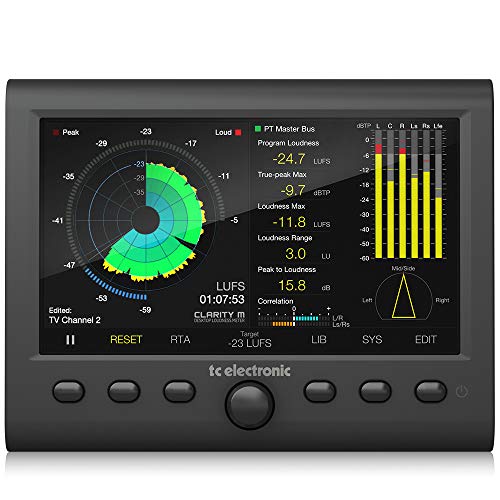


Product Information: This kit adopts the mature 5th generation front-level driver board plus classic backlight 35mm VU meter head, with driver board, suitable for telephone, computer, preamplifier, Mp3. VU meter backlight voltage: AC6V-12V DC current; 500uA +-15% DC internal resistance: 650 ohm + -15% Working temperature: -22%-55 degrees Celsius
Frequently Asked Questions
What Are the Audio Requirements for Spotify Podcasts?
Spotify podcasts require audio files to have a minimum sample rate of 44.1 kHz, preferably in MP3 or AAC formats. While bit depth recommendations exist, creators must focus on optimizing bitrate for audio quality during playback.
What Are the Apple Podcast Requirements?
Apple Podcasts requires episodes to meet specific audio format guidelines, including acceptable codecs and loudness levels. Additionally, content must adhere to guidelines that guarantee appropriateness, enhancing discoverability through well-structured metadata accompanying each episode.
What Is the Audio Standard for Podcasts?
Ironically, while aspiring podcasters often overlook audio standards, ideal audio quality demands careful attention to encoding formats. Meeting specific bitrates and channel requirements guarantees a seamless listening experience, essential for keeping audiences engaged and entertained.
Is Spotify 16 or 24-bit?
Spotify supports both 16-bit and 24-bit audio files. However, 24-bit is favored for its superior audio quality, offering enhanced dynamic range and detail, making it a preferred choice for audio professionals seeking ideal playback experience.


