As an Amazon Associate, we earn from qualifying purchases. Some links on this site are affiliate links at no extra cost to you. Our recommendations are based on thorough research and editorial judgment.


The 10 Best XLR Audio Interfaces of 2026 for Professional Sound Quality

If you’re aiming for high-quality audio in 2026, you’ll love these XLR audio interfaces. The Focusrite Scarlett Solo 4th Gen offers studio-grade converters and easy setup. FIFINE’s mixers are perfect for gamers and musicians alike, featuring USB and XLR connections. Shure’s MVX2U gives you seamless USB conversion for on-the-go recording. And if you’re a beginner, M-AUDIO M-Track Solo’s compact design is a winner. Stick around, and you’ll discover more about your perfect audio companion!
Key Takeaways
- Focusrite Scarlett Solo 4th Gen offers studio-grade converters with a dynamic range of 120dB, enhancing vocal and guitar recordings.
- FIFINE PC Audio Mixer features real-time monitoring and 48V phantom power, suitable for quality vocal recordings with its user-friendly design.
- Shure MVX2U provides seamless XLR to USB conversion, compact portability, and real-time monitoring, perfect for podcasters and musicians on the go.
- Focusrite Vocaster One delivers high-quality sound with auto gain and Enhance presets, tailored for solo recording applications.
- M-AUDIO M-Track Solo ensures clear audio resolution at 48 kHz with zero-latency monitoring, ideal for efficient music production.
Focusrite Scarlett Solo 4th Gen USB Audio Interface for Musicians

Focusrite Scarlett Solo 4th Gen USB Audio Interface, for the Guitarist, Vocalist, or Producer...
- The new generation of the songwriter's interface: Plug in your mic and guitar and let Scarlett Solo 4th Gen bring big studio sound to wherever you make music
- Studio-quality sound: With a huge 120dB dynamic range, the newest generation of Scarlett uses the same converters as Focusrite’s flagship interfaces, found in the...
- Find your signature sound: Scarlett 4th Gen's improved Air mode lifts vocals and guitars to the front of the mix, adding musical presence and rich harmonic drive to your...

If you’re a guitarist or vocalist looking to elevate your sound, the Focusrite Scarlett Solo 4th Gen USB Audio Interface might just be your new best friend. This sleek, 14.4-ounce device is a powerhouse, boasting studio-grade converters with a dynamic range of 120dB—seriously impressive! The improved Air mode brings out the best in your vocals and guitars, adding musical presence and richness. Plus, it comes with a robust software bundle, including Pro Tools Intro+ and Ableton Live Lite, perfect for those who like to experiment. Setup’s a breeze, and you’ll get 24/7 support. Trust me, your recordings will sound professional—no fancy studio required!
Best For: Musicians, including guitarists and vocalists, who seek high-quality recording in a compact and portable format.
Pros:
- Studio-grade audio quality with a 120dB dynamic range that rivals professional studio gear.
- Impressive software bundle that includes popular DAWs and plugins for a complete recording experience.
- User-friendly setup with the Easy Start feature and round-the-clock support.
Cons:
- Limited connectivity options compared to more advanced interfaces.
- No MIDI input/output, which might be necessary for some electronic musicians.
- Can be pricey for beginners looking for basic recording solutions.
FIFINE PC Audio Mixer for Recording Music
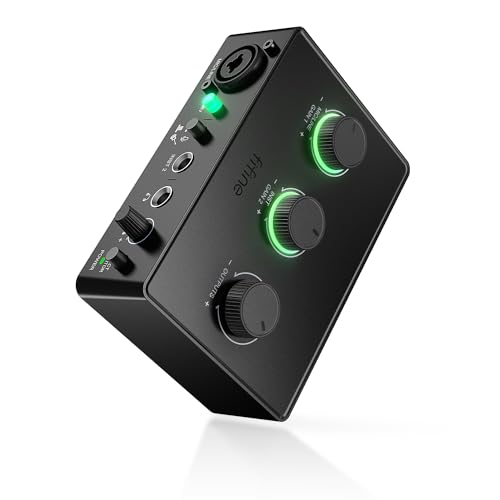
FIFINE PC Audio Mixer for Recording Music, USB Interface for Streaming and Podcasting with XLR...
- [Improved Sound Quality] The PC audio mixer comes with one XLR microphone interface and one instrument interface. The two input interface aims to elevate your recording...
- [XLR Microphone Interface] Equipped with XLR microphone interface, the recording audio interface grant you the freedom to connect your XLR microphone to capture...
- [Instrument Input and Audio Output] Whether you're a guitarist or bassist, the podcast mixer get you covered. Connect dedicated instrument input and experience rich and...
Looking to step up your audio game? The FIFINE PC Audio Mixer is your go-to for recording music, streaming, or podcasting. Weighing just 1.1 pounds and measuring 5.51 x 6.3 x 1.97 inches, it’s compact and easy to set up. With a USB interface, XLR connection, and 48V phantom power, you’ll capture high-quality vocals like a pro. Plus, it includes a dedicated volume knob for real-time monitoring—no more guessing if you’re loud enough! Compatible with both Mac and PC, it works with headphones, instruments, and more. Say goodbye to mediocre sound and hello to studio-level quality!
Best For: The FIFINE PC Audio Mixer is best for musicians, podcasters, and streamers looking for a compact and versatile mixing solution to achieve studio-level sound quality.
Pros:
- Compact Design: Lightweight and easily portable, making it ideal for on-the-go recording.
- High-Quality Sound: Features XLR microphone interface and instrument input for superior audio performance.
- User-Friendly: Plug-and-play functionality ensures quick and easy setup for both Mac and PC users.
Cons:
- Limited Inputs: Only one XLR and one instrument input may not suffice for users needing multiple channels.
- Phantom Power Requirement: XLR microphones require 48V phantom power, which may limit the types of mics compatible without additional equipment.
- Basic Controls: Lacks advanced features found in higher-end mixers, which might be a drawback for professional users.
FIFINE Gaming Audio Mixer with XLR Microphone Interface

FIFINE Gaming Audio Mixer, Streaming RGB PC Mixer with XLR Microphone Interface, Individual Control...
- [XLR Mic Input] One XLR microphone input interface is set on the gaming audio mixer, which is great to up your audio quality with your XLR setup. The XLR mixer is a...
- [Individual Channel Control] Gaming audio mixer for one mic recording with smooth volume slider fader take your streaming recording to a whole new level with full...
- [Mute and Monitor] The front mute and monitor buttons but not at the back, make it easier to get the audio interface use. Ability to mute audio, the audio mixer for...
The FIFINE Gaming Audio Mixer is a game-changer for anyone diving into streaming, podcasting, or serious recording. With its XLR microphone input and built-in 48V phantom power, you’re all set for exceptional audio. You’ll love the four independent channels, allowing you to mix microphone, LINE IN, headphones, and LINE OUT with ease. Plus, those customizable sound buttons? They’re perfect for adding flair to your streams!
Connecting via USB-C, it supports dual PC audio, making setup a breeze. Its RGB lighting brings cool vibes without distracting you—seriously, no one wants a disco while they’re trying to podcast!
Best For: Streamers, podcasters, and content creators seeking high-quality audio mixing and effects for their broadcasts.
Pros:
- Versatile Inputs: Offers an XLR microphone input and dual PC audio support for diverse use cases.
- Customizable Effects: Features sound effect buttons and voice modulation options that enhance creativity during recordings.
- User-Friendly Design: Front-facing controls and RGB lighting make the mixer easy to use and visually appealing.
Cons:
- Limited Inputs: Only one XLR interface may restrict users who want to connect multiple microphones.
- Dependency on External Cables: Requires a 3.5mm audio cable for LINE IN, which may not be included.
- Learning Curve: Beginners may need some time to fully utilize all features and settings effectively.
Shure MVX2U XLR-to-USB Interface with Headphone Jack

Shure MVX2U XLR-to-USB Digital Audio Interface, Headphone Jack, 60dB Gain, Zero-Latency Monitoring...
- PLUG AND STREAM: XLR to USB connectivity with Auto Level Mode gets you broadcasting instantly, transforming any XLR microphone into a professional streaming and recording...
- UNIVERSAL MIC COMPATIBILITY: Up to 60dB of clean gain and 48V phantom power means any microphone works flawlessly, from dynamic legends like the SM7B to the most...
- ZERO-LATENCY MONITORING: Built-in 3.5mm headphone jack delivers real-time audio monitoring and playback with no delay, so you hear exactly what your audience hears as you...
For those craving exceptional sound quality without a hassle, the Shure MVX2U XLR-to-USB Interface with headphone jack is a standout choice. It converts XLR microphones to digital seamlessly, offering up to 60dB of clean gain, and supports 48V phantom power for your condenser mics. With its built-in 3.5mm headphone jack, you can monitor audio in real-time—no more guessing if you’re loud enough! Measuring just 1.1 by 3.35 inches and weighing under four ounces, it’s super portable. Whether you need a quick setup for streaming or a durable tool for pro recording, this interface covers all bases!
Best For: The Shure MVX2U XLR-to-USB Interface is best for podcasters, musicians, and content creators seeking high-quality audio conversion with real-time monitoring.
Pros:
- Seamless conversion from XLR to USB for easy digital recording.
- Real-time audio monitoring with a built-in 3.5mm headphone jack.
- Compact and portable design, making it ideal for on-the-go recording.
Cons:
- Requires a USB power source, which may limit some remote recording options.
- Limited custom DSP features unless used with the ShurePlus MOTIV Desktop App.
- Potential compatibility issues with certain audio software not mentioned in product details.
Focusrite Scarlett Solo 3rd Gen USB Audio Interface

Focusrite Scarlett Solo 3rd Gen USB Audio Interface for Guitarists, Vocalists, Podcasters or...
- Pro performance with great pre-amps - Achieve a brighter recording thanks to the high performing mic pre-amps of the Scarlett 3rd Gen. A switchable Air mode will add...
- Get the perfect guitar and vocal take with - With two high-headroom instrument inputs to plug in your guitar or bass so that they shine through. Capture your voice and...
- Studio quality recording for your music & podcasts - Achieve pro sounding recordings with Scarlett 3rd Gen’s high-performance converters enabling you to record and mix...
If you’re a guitarist, vocalist, podcaster, or just someone diving into music production, the Focusrite Scarlett Solo 3rd Gen USB Audio Interface is a game-changer. This interface delivers studio-quality sound with its 24-bit/192 kHz converters, ensuring your recordings shine. It features stellar mic pre-amps and a handy Air mode, making it perfect for acoustic instruments and vocals. Plus, those two high-headroom instrument inputs keep your guitar or bass distortion-free. Weighing only 12.3 ounces, you can easily take it anywhere. With software like Pro Tools Intro+ included, you’ll have everything you need to start producing like a pro—no strings attached!
Best For: Guitarists, vocalists, podcasters, and music producers seeking a high-quality, portable audio interface for professional recordings.
Pros:
- Studio-quality sound: 24-bit/192kHz converters ensure clear and professional recordings.
- Portable design: Lightweight at 12.3 ounces, easy to transport for on-the-go recording.
- Included software suite: Comes with Pro Tools Intro+, Ableton Live Lite, and more, giving users powerful tools to start producing music quickly.
Cons:
- Limited input options: Only one XLR input and one instrument input, which may not be sufficient for larger setups.
- No MIDI connectivity: Lacks MIDI I/O, limiting use with MIDI devices.
- Power supply reliance on USB: It doesn’t function without a computer or USB power, which may restrict certain use cases.
Elgato Stream Deck + XLR Audio Mixer & Controller

Elgato Stream Deck + XLR - Audio Mixer & Controller, Rear XLR-to-USB Mic Interface, Compatible with...
- Stream Deck + with XLR Dock becomes the ultimate audio station; In the back, plug in your XLR microphone for studio-like sound; Up front, customize controls to mix...
- Tactile Control, Visual Feedback: LCD keys, touch strip, and dials for audio, video, lighting, and more; Know that your command has been executed
- Powerful Plugins: Elgato Wave Link, Camera Hub, Control Center, OBS, Twitch, YouTube, Twitter, Discord, Spotify, Philips Hue, and many more
Looking to elevate your podcasting or streaming game? The Elgato Stream Deck + XLR Audio Mixer & Controller is just what you need. With its XLR-to-USB mic interface, you can connect any microphone for that studio-quality sound. It boasts customizable controls, eight LCD keys, and four multifunction dials, all for seamless audio, video, and lighting management. Expect 75 dB of gain and 48V phantom power—perfect for condenser mics! Plus, it powers up via USB. It’s the ultimate tool for creators, blending functionality and ease of use. Get ready to sound like a pro without the fancy studio (no tux required!).
Best For: Podcasters, streamers, and content creators looking for an all-in-one audio solution that offers professional-grade sound quality and customizable controls.
Pros:
- Customizable controls: Easily tailor audio, video, and lighting settings to suit your needs.
- Studio-grade sound quality: With 75 dB gain and phantom power, it supports high-quality microphones for clear audio.
- Multiple plugin support: Compatible with popular platforms like OBS, Twitch, and Discord, enhancing usability.
Cons:
- Weight and size: It may take up more desk space compared to simpler audio interfaces.
- Limited compatibility with older systems: Requires modern operating systems (Windows 10 and macOS 13 or later).
- Not standalone: Dependent on USB power, requiring a connection to a computer for operation.
Focusrite Vocaster One Podcasting Interface for Solo Recording
Sale


Focusrite Vocaster One — Podcasting Interface for Recording as a Solo Creator. Use Auto Gain...
- Broadcast quality sound – Get studio sound in seconds from Vocaster’s premium mic input
- Over 70dB of gain – Get the best out of any mic, no booster needed
- Auto Gain – Set your level in seconds, just push the button, start talking, and let Auto Gain do the rest
The Focusrite Vocaster One is a fantastic podcasting interface designed specifically for solo creators who demand high-quality audio. Weighing just 1.58 pounds and measuring 4.45 x 7.66 x 1.99 inches, it’s lightweight and easy to set up. With over 70dB of gain, you won’t need a booster—what a relief! The auto gain feature sets levels instantly, and the four Enhance presets improve your voice quality like magic. Plus, the mute function lets you dodge those pesky interruptions. With USB-C connectivity, it’s compatible with nearly everything. You’ll love the 4.4-star rating from fellow podcasters; they can’t get enough!
Best For: Solo podcasters seeking a lightweight, high-quality audio interface that is easy to set up and use.
Pros:
- High-quality broadcast sound with over 70dB of gain, eliminating the need for a booster.
- User-friendly features like auto gain and voice enhancement presets improve recording quality effortlessly.
- Versatile connectivity options make it compatible with a wide range of devices, including cameras and smartphones.
Cons:
- Designed primarily for solo recording, which may limit its usability for multi-person podcasts.
- Some users may find the lack of additional inputs restrictive for complex setups.
- Weight and size may not appeal to those seeking a more robust, professional-grade interface.
M-AUDIO M-Track Solo USB Audio Interface for Recording and Streaming

M-AUDIO M-Track Solo USB Audio Interface for Recording, Streaming and Podcasting with XLR, Line and...
- Podcast, Record, Live Stream, This Portable Audio Interface Covers it All - USB sound card for Mac or PC delivers 48kHz audio resolution for pristine recording every time
- Be ready for anything with this versatile M-AUDIO interface - Record guitar, vocals or line input signals with one combo XLR / Line Input with phantom power and one Line...
- Everything you Demand from an Audio Interface for Fuss-Free Monitoring - 1/8" headphone output and stereo RCA outputs for total monitoring flexibility; USB/Direct switch...
For anyone venturing into recording, streaming, or podcasting, the M-AUDIO M-Track Solo USB Audio Interface stands out as a solid choice. Weighing just 10.6 ounces, it’s perfect for on-the-go audio fun. With 48 kHz audio resolution, your recordings will sound crisp and clear, whether you’re on a Mac or PC. Plus, its combo input with phantom power lets you plug in microphones or instruments with ease. You’ll love the zero-latency monitoring, too—no more frustrating delays! And with bundled software like MPC Beats and Ableton Live Lite, you can jump into music production right away. Happy recording!
Best For: Aspiring musicians, podcasters, and streamers seeking a portable and user-friendly audio interface for high-quality recordings.
Pros:
- Compact and lightweight design, ideal for on-the-go recording.
- High-quality 48 kHz audio resolution ensures clear and professional sound.
- Includes bundled software for immediate music production capabilities.
Cons:
- Limited to one combo input, which may restrict multi-source recording.
- No MIDI input options for connecting MIDI devices.
- May require additional setup for certain software compatibility on different operating systems.
XTUGA USB Audio Interface for PC

XTUGA USB Audio Interface for PC,Interface for Recording Music Computer Recording Audio Interface...
- [Reliable Dual Inputs for Daily Use] This Q-12 audio interface provides professional 16-Bit/48kHz resolution for pristine sound. Unlike others with popping noise, our...
- [48V Phantom Power & Zero Latency] Capable of driving condenser mics with switchable 48V power. Say goodbye to high latency; this xlr interface features fast transmission...
- [Plug and Play] Functioning as a stable audio interface for PC via USB connection. Powered directly from your computer, no external adapter needed. Simply plug in and...
Ready to take your music production to the next level? The XTUGA USB Audio Interface for PC, model Q-12, is perfect for you. It features XLR and 3.5mm microphone jacks, so you can connect your favorite mics with ease. With ultra-low latency, your recordings will flow smoothly—no more annoying lag!
You’ll get studio-quality audio up to 16-bit/48 kHz. Plus, the independent volume controls help you keep your levels just right—no red flashing lights, please! It’s compatible with top software like Audacity and Pro Tools, making it a versatile choice. At 10.8 ounces, it’s lightweight too!
Best For: The XTUGA USB Audio Interface is best for both beginner and professional musicians looking to enhance their home studio recording experience.
Pros:
- High-performance converter enables studio-quality recordings up to 16-bit/48 kHz.
- Supports 48V phantom power for condenser microphones, allowing for versatile microphone options.
- Independent volume controls with gain halo meters help to maintain optimal audio levels.
Cons:
- Limited to a maximum audio resolution of 16-bit/48 kHz, which may not be sufficient for high-end production needs.
- Customer reviews indicate a moderate satisfaction rating of 4.0 out of 5 stars, suggesting potential concerns from some users.
- Certain features may require familiarity with audio interfaces, which could be challenging for complete beginners.
PUPGSIS Gaming Audio Mixer for PC and Streaming
Sale

PUPGSIS Gaming Audio Mixer, Audio Interface for PC/Podcast/Streaming, Sound Board with 3.5mm/XLR Mic...
- Power Up Your Voice: Equipped with a professional preamplifier and 48V phantom power, the audio mixer works perfectly with your favorite XLR microphone to deliver...
- Customize Your Audio: This gaming audio mixer features six voice-changing modes, allowing you to easily experiment with different sounds or add a touch of humor to your...
- Individual Channel Controls: The DJ mixer has a simple and intuitive interface for easy operation. Four smooth volume faders independently control the levels for Mic...
Looking to take your streaming or podcasting game to the next level? The PUPGSIS Gaming Audio Mixer is your go-to tool. Weighing just 1.28 pounds and measuring 6 x 5 x 2 inches, it’s compact yet powerful. With a 3.5mm/XLR mic input and 48V phantom power, you’ll enjoy crisp, professional audio quality. The user-friendly interface features four volume faders to control multiple channels with ease. Want to spice things up? Try its six voice-changing modes or four soundpads. Plus, it’s compatible with your favorite platforms like OBS and Discord. So, are you ready to sound amazing?
Best For: Streamers, podcasters, and content creators looking for a compact and versatile audio mixer to enhance their audio quality.
Pros:
- Easy to use with an intuitive interface featuring independent volume controls for multiple channels.
- Offers high-quality audio with professional preamplifier and 48V phantom power for XLR microphones.
- Multiple creative features including six voice-changing modes and four customizable soundpads.
Cons:
- Limited to three microphone inputs, which may not be enough for larger groups.
- Requires a power source due to corded electric design, reducing portability.
- Some users may find the Bluetooth connectivity less reliable for live streaming.
Factors to Consider When Choosing an XLR Audio Interface

When you’re shopping for an XLR audio interface, keep a few key factors in mind. Think about input options, sound quality features, and how you’ll monitor your audio, because the right mix can make or break your recordings. Don’t forget about portability and any software bundles, too; they may just save you a headache later on!
Input Options and Compatibility
Selecting the right XLR audio interface might feel overwhelming, but it doesn’t have to be! Start by checking input options; having multiple inputs like XLR and instrument inputs is essential for various recording needs. You’ll want compatibility with different microphones too—think dynamic and condenser types. This is especially important if you plan on using condenser mics, as they need phantom power, usually 48V, to operate.
Don’t forget about ease of use! Look for plug-and-play options that work seamlessly with Mac, Windows, and iOS. And if you’re all about that real-time audio feedback during sessions, interfaces with dedicated monitoring features—like headphone outputs or direct monitoring—are a must-have! It’s all about making your creative process smoother!
Sound Quality Features
Sound quality features are essential for your recordings, especially if you want them to rival those from professional studios. Look for audio interfaces equipped with studio-grade converters offering up to 120dB dynamic range—trust me, you’ll hear the difference! Aim for a minimum audio resolution of 48 kHz to capture high-quality sound. Some interfaces even have cool modes like “Air mode,” adding that magical richness to vocals. Don’t ignore zero-latency monitoring; it’s key for hearing yourself in real time—no one likes a delay, right? Finally, consider those supporting phantom power (48V) for condenser mics. If you’re serious about sound, these features aren’t just bells and whistles—they’re what’ll keep your recordings polished and professional.
Monitoring Capabilities
Choosing the right XLR audio interface can feel overwhelming, but let’s simplify it. One key factor is monitoring capabilities. You want real-time sound accuracy, right? Look for zero-latency monitoring. This feature lets you hear your voice or instrument without any delay—pretty awesome, huh?
Direct monitoring options with dedicated volume controls are also handy, letting you balance input and playback audio easily. Many interfaces include headphone output jacks, too, making it super convenient to monitor while recording.
If you’re really diving into the deep end, consider advanced options like stereo loopback, which blends computer audio with live inputs for richer recordings. Trust me, these features make a world of difference when creating professional-quality sound!
Software Bundles Included
When diving into the world of XLR audio interfaces, one thing you can’t overlook is the software bundles that often come with them. Many interfaces include popular digital audio workstations (DAWs) like Pro Tools Intro+ and Ableton Live Lite—perfect for beginners. Some go the extra mile, offering packages such as FL Studio Producer Edition and Hitmaker Expansion, loaded with effects and instruments you’ll actually use! Remember, you’ll need to register and download these to access their full potential, but it’s well worth it. Having access to diverse audio production applications means you can jumpstart your music-making journey right away. With the right software, even seasoned producers can elevate their recording experience, making it all feel just a bit more “pro!”
Portability and Design
Portability matters more than you might think! If you’re a musician or content creator, you’ll want an XLR audio interface that’s easy to carry. Look for lightweight models under 2 pounds; they won’t weigh you down during gigs or recording sessions. Interfaces measuring around 5 to 6 inches in width and depth can snugly fit in your laptop bag or backpack—bonus! Many of these compact devices come with USB-C connectivity, ensuring compatibility while maintaining a sleek design. Plus, it’s essential to choose one with rugged build quality, so it can handle the bumps and scrapes of travel. Remember, you want durability without lugging around a brick; your back will thank you!
Frequently Asked Questions
What Is the Difference Between XLR and USB Audio Interfaces?
XLR and USB audio interfaces differ mainly in connectivity and sound quality. XLR interfaces use three-pin cables for high-quality, balanced audio connections, making ‘em perfect for professional microphones. USB interfaces are more user-friendly, plugged straight into your computer, easily suited for home setups, but usually offer lower sound quality. So, if you want that pro vibe, XLR’s the way to go. If you just want simplicity, USB’s your buddy. Get what fits your needs!
Do I Need Phantom Power for All Microphones?
No, you don’t need phantom power for all microphones. It’s mainly required for condenser mics, which need extra juice to capture their beautiful sound. Dynamic mics, on the other hand, don’t need it; they’re perfectly happy without any extra power. So, if you’re checking your gear, just know that using phantom power on a dynamic mic can actually cause damage. Keep that in mind, and you’ll save yourself some headaches later!
Can I Use an XLR Interface Without a Computer?
Yes, you can totally use an XLR interface without a computer! For example, imagine you’re at a gig with just your microphone and a portable interface like the Focusrite Scarlett Solo. It’s compact and connects directly to your gear. You could even route it to a speaker system. Just remember, while it’s super convenient, you’ll need some power or a battery, so you won’t sap the fun! So, go ahead and get creative!
How Do I Connect My Audio Interface to Studio Monitors?
To connect your audio interface to studio monitors, you’ll need balanced TRS cables. Plug one end into the interface’s output, and the other end into your monitor’s input. Make certain to match left and right channels. If your monitors have different input types, adapters might be necessary— no biggie! Confirm volume levels are modest to avoid a surprise ear blast. With this setup, you’ll enjoy clear, professional sound—just like a pro!
What Cables Are Necessary for XLR Audio Interfaces?
To connect your XLR audio interface, you’ll need a few essential cables. First, grab some XLR cables—typically about 15 to 25 feet long should do. These are perfect for connecting microphones to your interface. If you’re linking your interface to studio monitors, get ¼-inch TRS cables. They usually cost around $10. So, don’t get tangled in cables—just make certain you have the right lengths for your setup, and you’re all set!


